Dynamic Interfaces
Overview
Software UIs have long assumed stable layouts: the same chrome, the same flows, maybe some personalization or A/B tests. Generative and agentic systems pressure that assumption: the “right” surface might be different per task, per moment, or per user utterance.
Proof of Concept — where this first appeared as a written series:
- Dynamic Interfaces — What if a UI could design itself? (May 2023)
- Dynamic Interfaces: Part Deux — What this means for end users
- Dynamic Interfaces: Part Trois — Thoughts on tooling and implementation
Interview with Ridd — a conversation on dynamic interfaces, AI, and where product surfaces might go next:
Notes
Introduction: why interfaces are the unsettled layer
The software interface layer is the least understood—and most unsettled—part of AI-era computing.
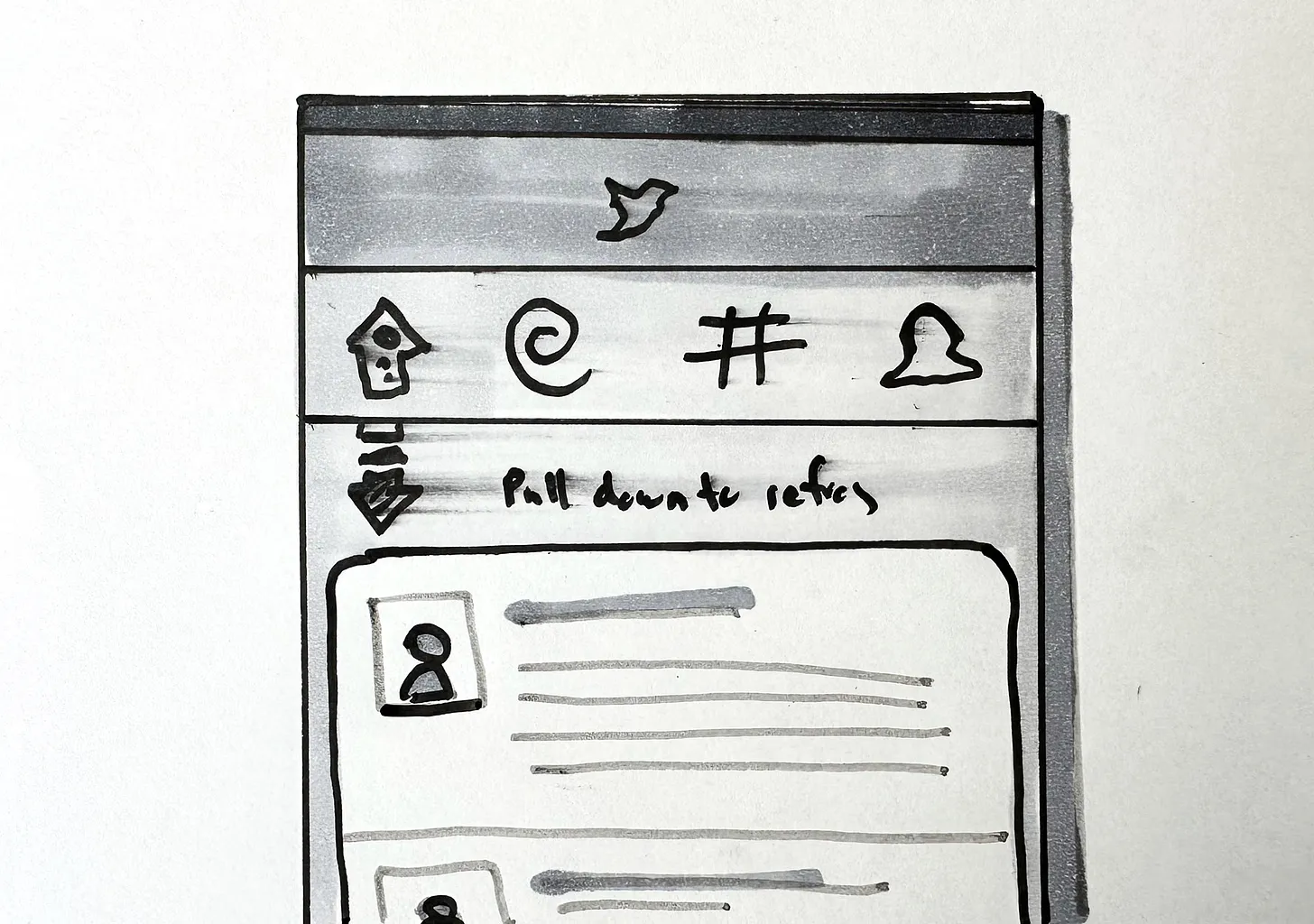
Every major computing shift goes through an awkward adolescence. Early versions look primitive in hindsight, not because the ideas were wrong, but because the interaction grammar had not yet been invented. The first release of iPhone OS famously lacked copy and paste. Touch computing existed, but its affordances were incomplete. A few years later, interactions like pull-to-refresh became so natural that we forgot they were ever invented.
Dynamic Interfaces (structured outline)
Introduction / thesis: what dynamic interfaces are
- The software interface layer is the part of AI-era computing that remains least understood and most unsettled.
- Early versions of new interaction paradigms always look primitive in hindsight (e.g., iPhone OS lacking copy/paste, pull-to-refresh emerging from Tweetie).
- Current AI interfaces—especially chat—are transitional forms, not the final pattern.
- Dynamic interface describes systems that redesign themselves based on feedback, intent, and context.
- Unlike responsive design or personalization based on cohorts, dynamic interfaces tailor the interface itself to individual users.
- As computation accelerates and learning cycles shorten, the interface can evolve continuously, not in slow human-run experiments.
- The future interface responds to behavior, preference, environment, and task—not just display dimensions.
A new MVC
Summarized by Dia.
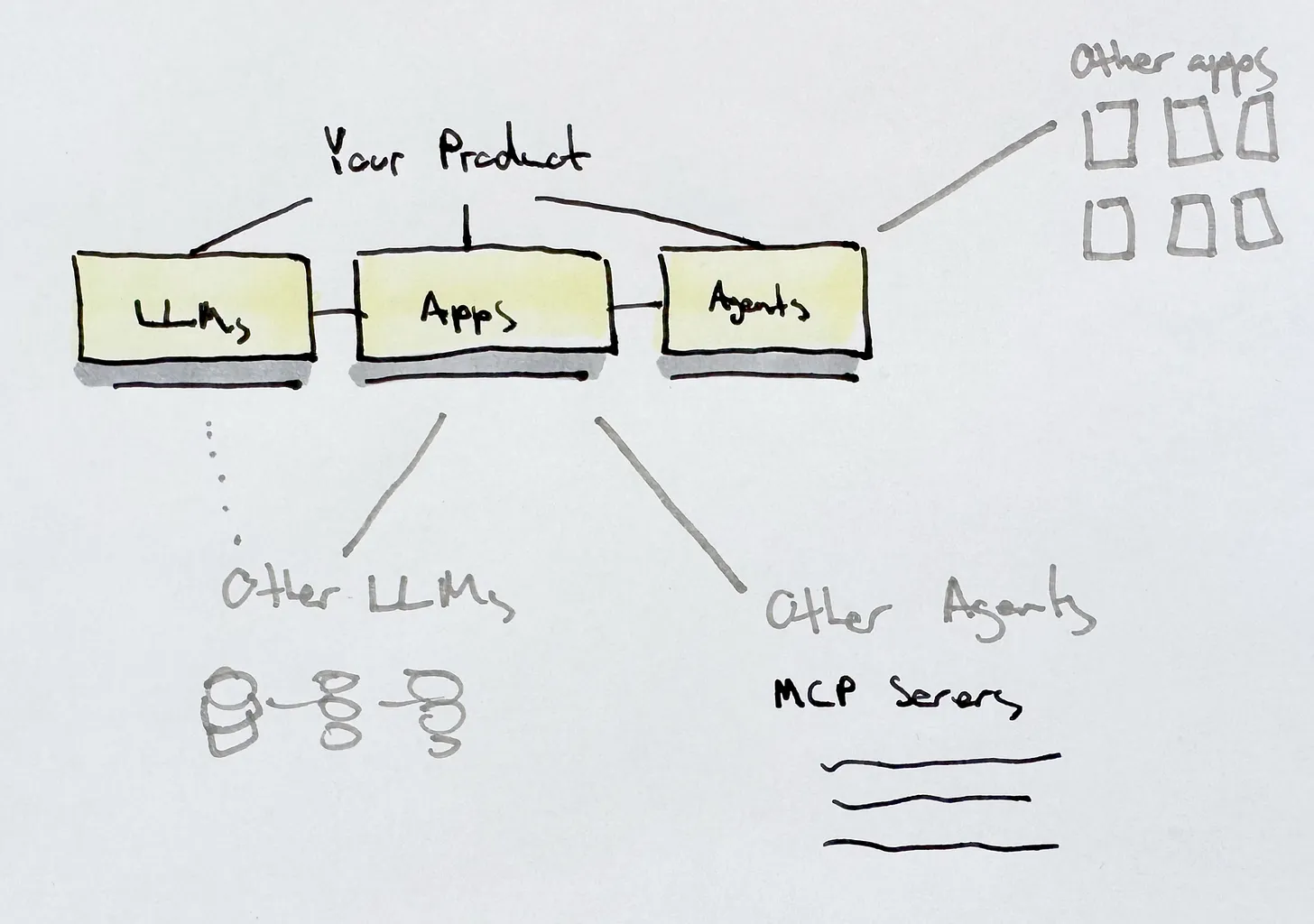
Context: Traditional MVC separated data, UI, and logic; AI and decentralized protocols (like MCP) are shifting this toward dynamic, agent-orchestrated, distributed systems.
- End users control and store their own data.
- Data also becomes inferred and summarized from LLMs.
- Context windows.
- Apps become interchangeable views over personal data stores.
- Interfaces are declarative queries across distributed data, not bespoke APIs.
New MVC
- LLMs as models: probabilistic, continuously trained systems—“grown, not built.”
- Apps as views: UI layers that render, query, and pass data; portability over storage; interoperability by design.
- Agents as controllers: interpret, plan, and coordinate actions across systems via protocols like MCP; real-time context switching.
Implications
- Shift from app-centric to system-centric product experiences.
- Managing endpoints, protocols, and interactions replaces monolithic codebases.
- Vendor lock-in becomes a liability; AI interfaces act as meta-layers across apps.
- Software is decoupling, enabling portability, ownership, and agent-driven orchestration.
Model
Models expand beyond a single datasource into LLMs, APIs, external datasets, and federated data. Users may choose models, build their own, or bring their own dataset (BYOD). Models become negotiable components, not fixed infrastructure.
View
The “view” becomes less about fixed screens and more about interface surfaces spanning devices and contexts. Influenced by Ruben Verborgh’s “apps as views” concept. Universal Control, Stage Manager, and AR environments hint toward interfaces that float across display boundaries. Views adapt not only in layout but in function, depending on the task and context.
Controller
The controller evolves most. Interaction is no longer exclusively initiated by the user; agents and AI controllers act on behalf of the user. User input remains the ground truth, but AI can propose or execute adjustments. The controller mediates between human intent, model capability, and interface behavior.
Non-deterministic workflows
Many AI-era flows won’t behave like fixed scripts: paths branch, retry, or adapt based on model output, tools, and context.
Context and ambient experience
Dynamic interfaces interpret context beyond device state (e.g., Focus modes, presence near a device). Software anticipates needs through richer contextual signals: environment, behavior patterns, ergonomics, accessibility preferences.
Multi-device experiences proliferate: phones, tablets, computers, wearables, XR displays, and invisible or ambient devices. Future environments have too many surfaces to design manually for each form factor.
Interfaces become ambient: flowing across devices, resizing themselves, reprioritizing content, and responding to user needs without being explicitly summoned.
End user experience
Human-centered by design
Personalization becomes possible with memory. Even when content was personalized to the end user, the interfaces were built in such a rigid way they didn’t get the value of it. Dynamic interfaces amplify human-centered design rather than threaten it. Users retain free will, not just “control.” Interfaces should be aligned with natural cognition.
Cognitive efficiency
Interfaces should minimize cognitive load (Jef Raskin’s framework).
Malleable software
Chat interfaces often hide complexity rather than reduce it. Dynamic interfaces can surface appropriate UI controls to replace or complement prompts.
UI as an abstraction layer
UI controls handle complexity for the user—e.g., style dials or sliders that modify multiple underlying properties. Products like Flair AI show how generative UI elements can help users steer outcomes without writing extensive prompt text.
Personalized accessibility
Humans are historically poor at prioritizing accessibility; machines can adapt interfaces in real time. Dynamic interfaces allow per-user adjustments for color, contrast, ergonomics, reading needs, and more, based on feedback inside the app.
Feedback loops
Feedback is no longer limited to formal usability sessions. Users provide input through natural language, gestures, screenshots, or in-context signals. The system iterates immediately, adjusting layout, hierarchy, or flow.
Configurable dynamism
Users choose how dynamic they want their interface to be—from fully static to highly adaptive. Choices include:
- Which models or algorithms to use
- How views are customized
- What logic the system can automate
Dynamic interfaces support personal software—software that builds itself around the user.
How we build dynamic interfaces
Design tools evolve into hybrid design–development environments
A future IDDE (integrated design and development environment): drawing or manipulating UI elements impacts functionality directly (similar to visual development tools). Tools like Figma will likely blend vector drawing, component authoring, logic definition, debugging, and automation.
Abstraction as a spectrum
Both high-level abstractions (no-code) and low-level control (code) are needed. Tools must help users move along the abstraction spectrum depending on skill and intent. Sophisticated concepts should not be introduced before users are ready; too much abstraction limits capability.
Extensibility and interoperability
AI models and agents will pressure walled gardens to open up. Interoperability becomes mandatory. Authoring environments must be extensible to accommodate numerous data sources, models, and agent workflows.
Defining what is “designable”
Developers and designers specify which parts of a UI can be modified dynamically and which remain fixed—analogous to IBDesignable in Xcode: declaring what the system may alter. Users could define constraints (e.g., what they want more or less of) that guide the system’s reconfiguration.
Developer-defined abstractions
Not all users need to understand raw code or agent orchestration. Libraries of logic, integrations, and templates will exist alongside component libraries. Collaboration requires multiple layers of comprehension and abstraction.
Structured and unstructured prompt criteria
Chat and direct manipulation can coexist. Adobe’s generative features point toward hybrid workflows where prompts trigger structured options. Prompts invoke intent; UI refines and executes it.
Conclusion
Dynamic interfaces are not a futuristic invention but a continuation of decades of software evolution. The opportunity is to connect past concepts with new capabilities and steer them toward human needs.
As interfaces become dynamic, software becomes more personal, adaptive, and humane—not more opaque. The goal is not AI designing everything for us, but AI helping us spend less time wrestling with software and more time on the work—and relationships—that matter.
Open questions
- Where does predictability (learnable affordances) trade off against adaptation (right control at the right time)?
- How do we avoid mode chaos when the interface can reshape itself?
- What patterns count as dynamic but still feel designed—not arbitrary?
Related
What links here
Other notes in the garden that point to this one.
- AI Interface Systems — Exploring how AI is reshaping interface design and interaction patterns
- A New MVC is Emerging — How AI and protocols are reshaping the classic Model-View-Controller pattern
Links
- Dynamic Interfaces — Proof of Concept
- Dynamic Interfaces: Part Deux — Proof of Concept
- Dynamic Interfaces: Part Trois — Proof of Concept
- Interview with Ridd — Dynamic interfaces (YouTube)
- What is AI's UI? (Hanselminutes with David Hoang)
- The growing importance of design in the age of AI (Figma)
- Human Interface Guidelines — Liquid Glass (Apple)
Discussion
Loading comments…